Why runsheets
Your runbook already says what to do. runsheets runs it with you and writes down what happened.
The 2 a.m. problem
The database is filling up. The on-call engineer finds the runbook on the wiki, last edited eleven months ago, and starts copying commands into a terminal. Step 3 prints something that doesn't look like the example. Was that expected? They carry on. Step 5 is "confirm the replica has caught up", and they think it has. An hour later the incident is closed, and the only evidence of what was actually run is scrollback in a terminal that is already gone.
Next month someone does the same thing, and nobody knows whether the runbook still works until they're halfway through it.
runsheets is for that gap between the runbook and the run.
What you get
-
Runbooks stay markdown
No new format. A runbook is a folder of markdown files, or one file whose
##headings are the steps. It still reads fine on GitHub and in your editor, and it diffs cleanly in a pull request. -
A Run button where the author asked for one
Add
runafter the language on a fence (```bash run) and that block gets a Run button. Blocks without it are only text. Nothing runs unless the author marked it and the operator clicked it. -
A record of every run
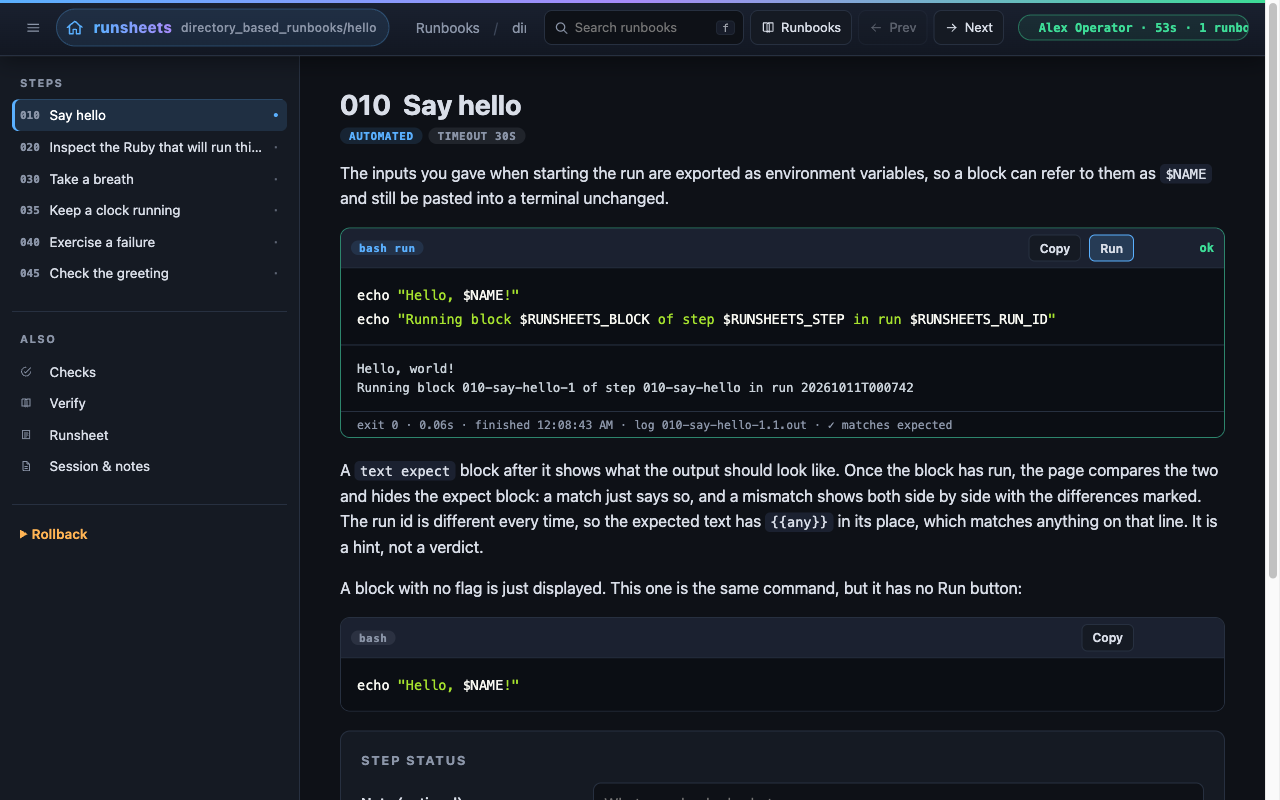
Every execution is saved in order: the exact command, its output, exit status, timing, and each manual step the operator acknowledged. That record is the runsheet, and it is kept outside the repository.
-
Expected output, checked for you
Put a
```text expectblock under a command and runsheets compares the real output against it, with{{any}}wildcards for the parts that change. A mismatch is shown as a diff, not left to whoever happens to be reading the output. -
Guard rails for dangerous steps
A
destructiveblock won't run until the operator types the confirmation code it shows. Aterminalblock is one the operator runs in their own shell and then confirms. Abackgroundblock (a tunnel, a tail) gets Start and Stop buttons. -
Inputs and secrets
Front matter declares inputs, and they become a form when a run starts. Values reach blocks as environment variables, so
$AWS_PROFILEworks in the browser and when pasted into a terminal. Secret inputs are masked and redacted from the record. -
History and drift
Every runbook lists its earlier runs. Open an old run and any block that has changed or been removed since then is flagged, with a diff against the code that actually ran.
-
Sessions and a live log
One sitting is one session: who, why, notes, and every runbook touched. Each action and each line of output goes to a session log as it happens, in a format you can
grep.
Who it's for
- On-call engineers and SREs who want incident procedures that can be run as written, with evidence of what was done.
- Platform and infrastructure teams with long, risky procedures such as teardowns, rebuilds, failovers and migrations, where a skipped step costs real money.
- Anyone with monthly chores, like database maintenance, disk triage or certificate rotation: work you do rarely enough to forget, but often enough to want written down.
- Teams that answer to auditors. "Show me what was run during the change window" becomes a file you can send.
Wiki page, shell script, or runsheets?
| Wiki runbook | Shell script | runsheets | |
|---|---|---|---|
| Explains why each step exists | yes | rarely | yes |
| Operator can stop and look between steps | yes | no | yes |
| Commands run exactly as written | no (copy/paste) | yes | yes |
| Output checked against what was expected | no | only if you write it | yes, expect blocks |
| Manual steps acknowledged and recorded | no | no | yes |
| Record of what actually happened | no | no | yes, every run |
| Runs with your own credentials, SSO sessions and tunnels | yes | yes | yes |
A wiki page explains well but records nothing. A script runs reliably but hides its reasoning and won't stop for a human decision. runsheets keeps the explanation and adds a recorded, step-at-a-time run.
Safe by design
runsheets runs commands, so its defaults are cautious:
- It binds to loopback and runs as you, on your machine, with your shell environment. There's no server to deploy and no shared credentials to manage.
- Blocks are opt-in. Only fences the author marked get a button.
- Destructive blocks need a typed confirmation.
- Secrets are masked in the form and redacted from the record.
- Records are written outside the runbook, so captured output never lands in your docs repository.
The Security Posture page has the full threat model.
Try it in two minutes
Pick Hello, runsheets. It uses every block kind and touches nothing on
your machine. Say who you are, click Start run, then click Run.
When you're done, look in
~/.local/share/runsheets/runs/directory_based_runbooks/hello/ for the
runsheet you just produced.
Pairs well with asgard
Keep long or reusable scripts in asgard task files beside
the runbook, and each block can be a single line like
asgard health.