The Web Page
Every page has the same frame: a sticky header, a sidebar, the content, and a footer with the keyboard shortcuts. The start page and the page shown after the session ends are the exceptions; they stand alone.
Starting the session
Everything from runsheets starting to it stopping is one session (see
Sessions, Runs and Runsheets). Unless the engineer
and the reason were given on the command line, the first page is the
Start a session page at /session/new, which asks:
- Who are you? Pre-filled from the configured engineer, else
git config user.name, else$USER. The name is the engineer's own statement; nothing authenticates it. - Why are you starting this session? The session's first note, timestamped like every later one. It is nothing more than that.
Both are required; submitting either blank shows the page again with a message. Until the session has started, every page redirects here. Once it has, this page redirects to the session page: a process holds one session.
With both given by --engineer and --why (or RUNSHEETS_ENGINEER and
RUNSHEETS_WHY, or engineer: and why: in a config file), the session
starts when the server does and this page is never shown. See
Command Line.
Header
- Brand and slug on the left link home.
- Breadcrumb: in a library, Runbooks and the folders above the runbook; then the runbook title, then the current step, or Runsheet, Checks or Session on those pages.
- Prev / Next move through the numbered steps. Disabled at the ends and on pages that are not steps.
- Session pill: the engineer, how long the session has been open, and
how many runbooks have a run in it, as in
Pat · 12m 05s · 2 runbooks. The time keeps counting while the page is open (it is updated every 15 seconds). It links to the session page. - Runbooks appears when the server was started on a directory of runbooks, and leads back to the library.
- Search runbooks, a search box on every page; see Search.
Sidebar
- Running: every process still running anywhere in the session, with the block id (linking to its step), the runbook's slug when it is not the runbook on screen (linking to it in the library), the pid, and a Stop button that works for any of them. The panel appears only while something is running and keeps itself current.
- Steps: every numbered step with its number, title and status mark. The current step is highlighted.
- Also: Checks,
rollbackand any other extra documents, the runsheet once the runbook on screen has a run, and Session & notes, which leads to the session page. - Rollback: on step pages, a collapsible panel containing the whole
rendered
rollback.md. - On this page: an outline of the current page's headings.
The sidebar toggles with the menu button or S; the choice is remembered in the browser.
Status marks
| Mark | Meaning |
|---|---|
· |
Nothing has happened on this step in this runbook's run. |
• |
At least one block ran or was confirmed, and none failed. A stopped background block counts as ran. |
✗ |
A block in this step failed, timed out, or could not start, and the step has not been marked. |
✓ |
Marked done by the operator. |
↷ |
Marked skipped by the operator. |
A manual mark always wins over the execution-derived mark, so a step whose
block failed but was then marked done shows ✓. The failure is still in
the record.
The mark of the step on screen updates as soon as one of its blocks
finishes, without a reload: • when it ran, ✗ when it failed (a
stopped block leaves the mark alone until the next reload). A step
that has been marked done or skipped keeps its mark, and a ✗ is not
turned back into • by a later block that succeeds.
Choosing a runbook
Started on a directory of runbooks (runsheets ops/runbooks), the session
opens on the library at /library. A markdown file whose front matter
has a title is a single-file runbook, every directory holding runbook.md
is a runbook directory, and every other directory is a folder, searched the
same way to any depth. Markdown files without that front matter are plain
documents: they stay out of the tree, and a runbook can link to them.
Folders that hold no runbooks are left out, as are hidden entries. Until a
runbook is selected, the library, the session page, search, and the
documents and files runbooks link to work; every other page redirects to
the library.
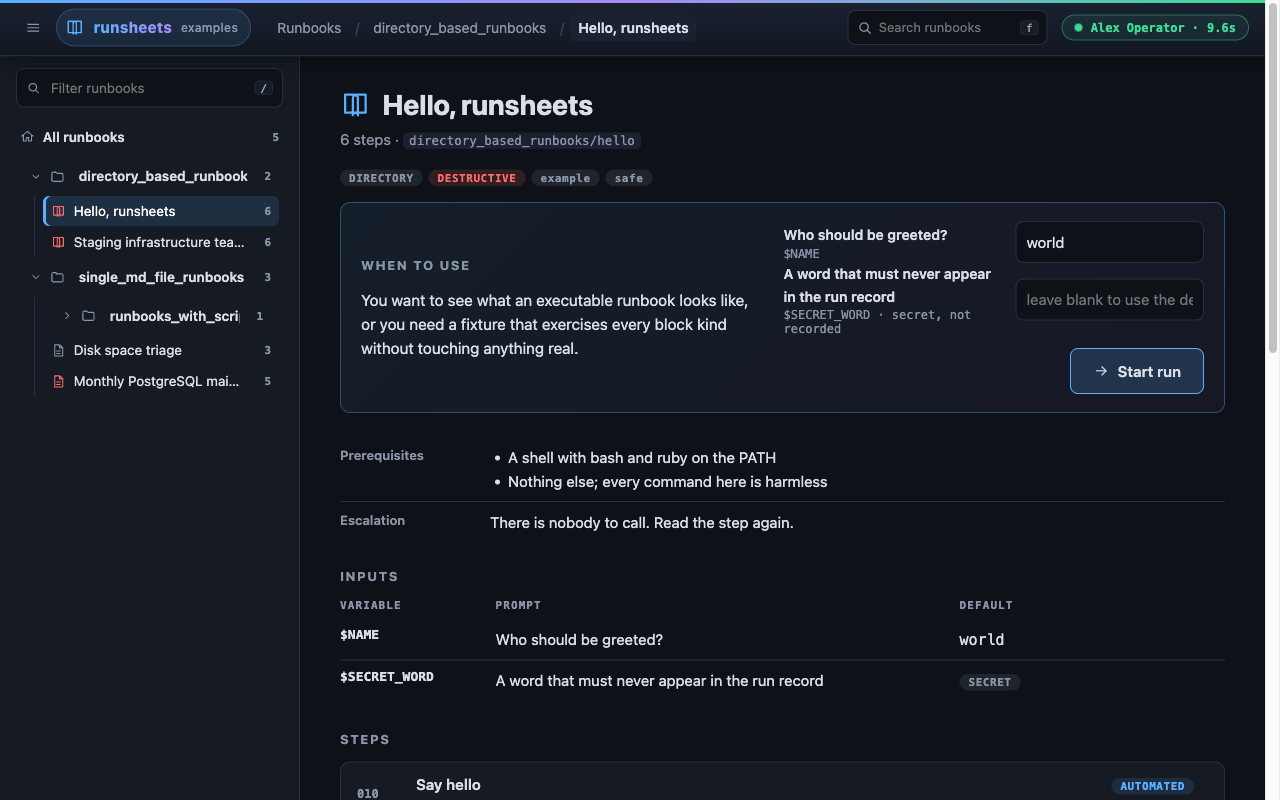
The page has two panes:
- The tree, on the left, under the Running panel when anything
in the session is running. Folders fold and unfold; runbooks show their
title and step count. A runbook that does not load is struck through
with a red
!; the runbook on screen carries a green dot. The filter box at the top (/ focuses it) narrows the tree to runbooks whose title, file name, path or tags contain the text, opening every folder that still has a match. The tree never descends into a runbook: itssteps/and other files are not part of the library. - The main pane, on the right, shows what is selected in the tree.
A folder shows its
README.md(rendered, if it has one) and a card for each folder and runbook it holds directly; the root folder is what/libraryshows. A runbook shows itswhen_to_usetext beside its action, then any authoring warnings, its prerequisites, blast radius and escalation, its inputs with their defaults, its steps with kind badges, its five most recent runs, and its preamble. The URL is the runbook's path in the library (/library/platform/database/backup), so it can be bookmarked. The session page and search results also sit in the main pane beside the tree.
What a runbook offers depends on where it stands in the session:
| State | Badge | Runbook pane | Card |
|---|---|---|---|
| No run yet | The inputs form and Start run | Start run for a runbook without inputs; Open, leading to the pane, for one with inputs | |
| Run open in this session | run open |
Return to its run | Return to its run |
| On screen now | open now |
Continue | Continue |
| Does not load | does not load |
The load error | nothing |
Start run establishes the runbook's run with the inputs in the form and goes to its landing page. Return to its run goes back to the run it already has; inputs are not asked for again. Selecting a runbook never finishes the run of the one you were on: every run in the session stays open, and every background process keeps running. In the runbook pane, O presses its button.
From a runbook's pages, the header breadcrumbs lead back through the
folders to the library, and the Runbooks button (R) goes straight
to it. A runbook's slug is its path inside the library
(platform/database/backup), so two runbooks named alike in different
folders keep separate run records. Runbooks added, removed or edited while
the server is up appear on the next visit to the library. That includes a
runbook added to a folder that had none, a broken runbook directory once
it is fixed, and an edited folder README.md.
Two runbooks in one folder cannot share a slug. When they would
(deploy.md beside deploy/runbook.md), or when a runbook has the name
of a folder beside it (backup.md beside a folder backup/), the folder
or the first runbook in name order keeps the name and the other is shown
as a broken entry: "another runbook or a folder here already has the name
deploy; rename one".
Landing page
In order:
- Title, step count, tags. A red
destructivebadge appears when the runbook declares a blast radius or any step is destructive. - Authoring warnings, if any, in an amber banner. Fix them in the markdown; the page updates on reload.
- Metadata table: when to use, prerequisites, blast radius, escalation.
- The Start a run panel, or the Run open panel.
- Step list with kind badges, destructive badges, the number of executable blocks, and status marks.
- Previous runs, the 20 most recent, newest first, leaving out the
run that is open now.
Each row shows the run id (linking to the transcript), the status
(
running,completed,partial,opened,interrupted, orabandonedin records from before sessions), start time and duration, execution and failure counts, and steps done with the step it stopped at. A record of a verification run, from before sessions, carries averifybadge and shows checks run and how many are still failing. - The preamble from
runbook.md.
Starting a run
On a server started on one runbook, the landing page carries the Start a run panel until the runbook has a run. (In a library the same form is in the runbook pane.) It has one field per declared input; secret inputs are password fields. Each plain field is pre-filled with what the run would get if left alone: a value given for the same name earlier in the session, else the environment, else the default (see Inputs and Secrets). A secret field is always empty, so a secret is never put in the page. When the environment or the default has a value for it, its placeholder says "leave blank to use $NAME from the environment" or "leave blank to use the default", and a secret left blank is filled from there when the run starts. Submitting it creates the run directory and returns to the landing page, now showing the Run open panel.
No block executes until the runbook on screen has a run, not even one on a step page opened directly: until then its Run button is disabled, and hovering it says "Start a run to execute blocks". Starting a run does not fix the order: any step can be opened and run on its own, and the rest left untouched. See A run is a record, not a sequence.
The Run open panel
Shows the run id, when it was opened, its progress (executions, and steps
done out of the total), a link to the runsheet, and the inputs (values for
plain inputs, NAME=••• for a secret that is set). Then:
- Work through the steps, to step 1.
- Go to checks (N), where N is the number of executable blocks in
the verify steps and
verify.md; shown when there is at least one. - Change inputs, a folded form for a runbook with inputs. Plain fields
hold the current values. Secret fields are always empty, and a secret
left empty keeps its current value, so a secret never comes back to the
page. Blocks run after the change see the new values; the change is
recorded in the run as an
inputsevent and written to the session log.
There is no Finish or Abandon. The run stays open until the session ends.
The Checks page
Checks, in the sidebar, gathers every verify step and verify.md in
order on one page. With a run open, Run all executes each run block
on the page one after another and reports how many passed; its label
counts those run blocks. Destructive and background checks are left for
you to run with their own buttons, and the button is not shown when there
are no run checks. The checks run
inside the runbook's run like any other block. Without a run the page is
read-only.
Step pages
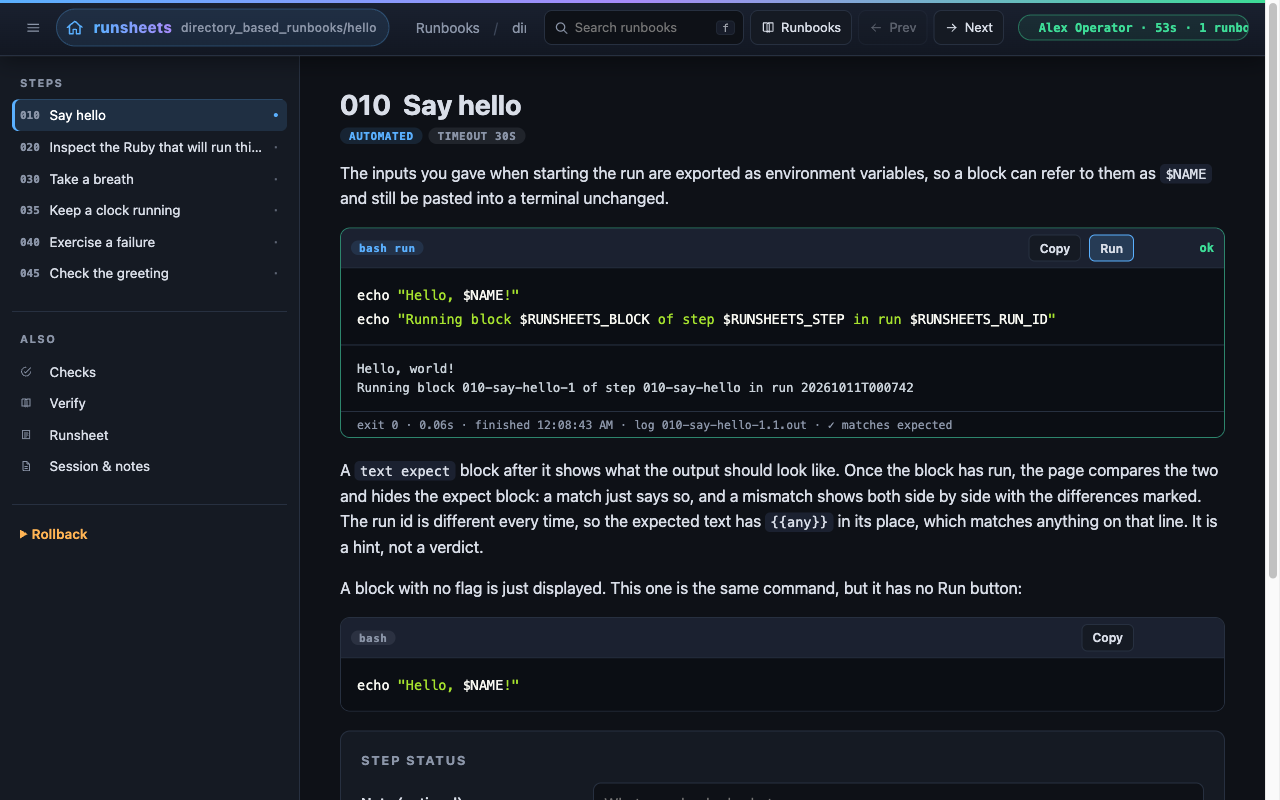
In order:
- Number and title, with badges for the kind,
destructive, and the timeout when the step has executable blocks. - Authoring warnings for this step, if any.
- Blast radius banner on destructive steps, in red, with the escalation contact. If the runbook declares no blast radius the banner says only that the step is destructive.
- An info banner when the runbook has no run yet and the step has executable blocks: blocks can be read and copied but not run, with a link to the landing page to start the run.
- The body, rendered.
- Step status panel (once the runbook has a run): a note field and two buttons,
Mark done and continue and Skip. Both record an event and move
to the next step, or home after the last one. On a
manualstep the panel is headed Acknowledge this step and the button reads I have done this, continue; it is the same event. - Prev / Next navigation.
Blocks
Every fenced block with a language has a toolbar:
- a badge with the language and flags,
- any warnings for the block,
- a note for
terminal,expectandbackgroundblocks; an expect block's note links to the block it illustrates, - Copy, which puts the code on the clipboard,
- Run or Run (destructive) on
runanddestructiveblocks, Start and Stop onbackgroundblocks, I ran this onterminalblocks, - a status area, announced to screen readers as it changes
(
role="status",aria-live="polite").
Each Run, Start and I ran this button is labelled with its block id for screen readers ("Run 010-say-hello-1").
Clicking Run posts to the server and starts polling. The status shows
running with the elapsed time, and the output area below the code fills
in as the process writes, scrolled to the bottom. When the process ends the
block's border turns green (exit 0), amber (stopped) or red (anything
else), the status shows ok, exit N, timed out, stopped or
failed to start, and the footer shows the exit status, duration, finish
time and the name of the .out file in the run directory. Output longer
than 256 KB is shown from its tail with a marker on the first line.
Run (destructive) asks the server to run the block; the server answers with a four-character code instead, the page shows it in a prompt, and the block runs only when you type the code back. The code is per block and is retired once used. It is a speed bump against a reflexive click, not a security control; the real guard is reading the banner above it.
Start on a background block is Run without a timeout. While it runs
the Stop button is shown and the process is listed in the sidebar's
Running panel. Stop ends the process group; the status becomes
stopped.
I ran this on a terminal block opens a prompt for an optional note and
records the confirmation. The block's border turns green, the status reads
confirmed, and the time and note are shown in the footer. It can be
confirmed again; the record keeps every confirmation.
Expected output
When an executable block is followed by an expect block, the real output
is compared with the expected text once the block has run (trailing
whitespace ignored, {{any}} matching anything within a line), and the
expect block is hidden. On a match the footer says ✓ matches expected. On
a mismatch the output and the expected text are shown side by side, line
beside line, with the differing characters highlighted, and the footer says
differs from expected. See Expect blocks.
A block can be run again at any time while the session lasts. Each execution gets its own files and its own entry in the record. The page shows the most recent one.
Reloading
Nothing re-runs on reload. The page restores the last execution of each block from the run record, including output, resumes polling if one is still running, and restores terminal confirmations.
Several tabs
Every page says which runbook it shows, and what it posts carries that
runbook: Run, Start, I ran this and the step's mark buttons send
runbook=<slug>. A tab left open on runbook A keeps acting on A's run
after another tab has put runbook B on screen. If A has no run in the
session, the action is refused with 409.
Runsheet page
The record of a run is the runsheet; the page and the sidebar call it
that. On disk it is run.json and run.md.
/run shows the transcript of the run of the runbook on screen, rendered.
Before that runbook has a run in this session, the same URL shows its most
recent run. /runs/<id> shows any previous run of the runbook on screen. The transcript is run.md from the run directory; see
The Run Record.
Above the transcript of a closed run, a Runbook changed since this run panel appears when any block that ran now reads differently in the runbook, with a line diff from what ran to what is there now, or when a block is gone. The record itself is never changed; this is the runbook drifting away from it.
Session page
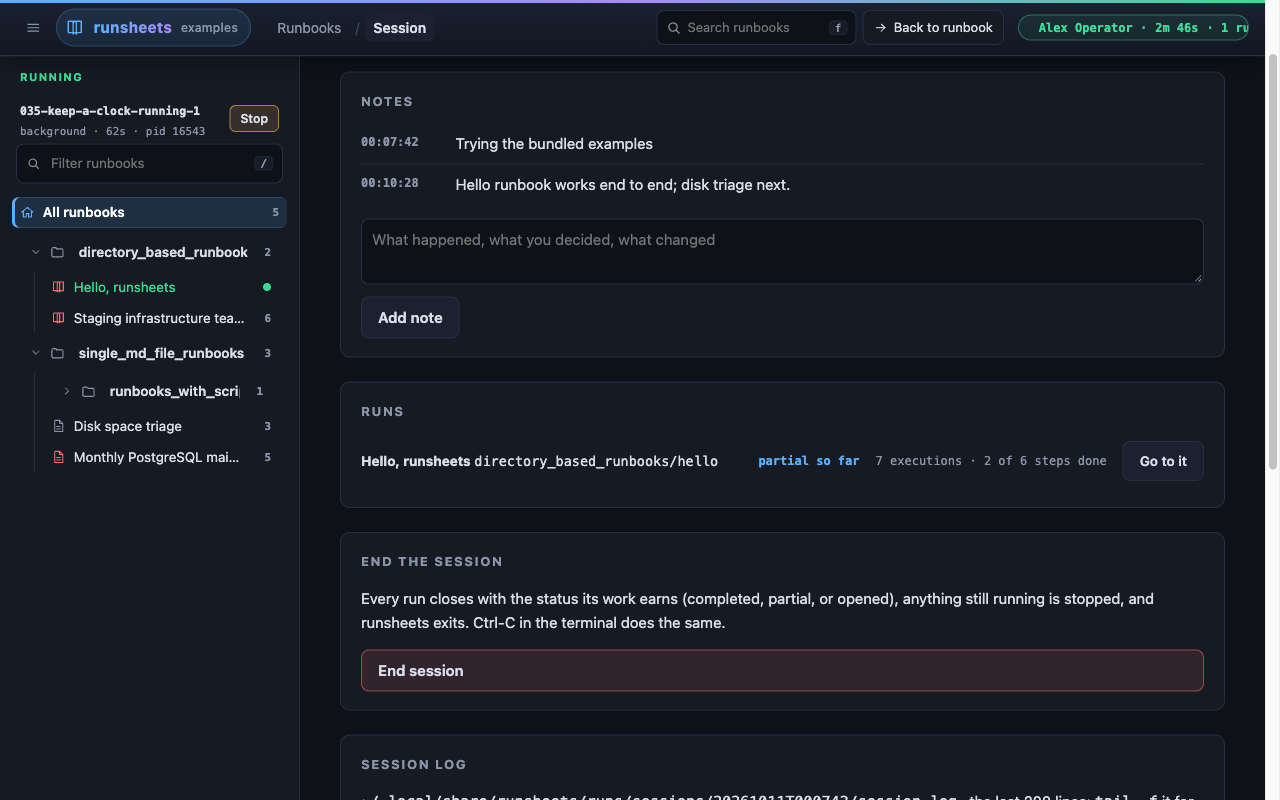
/session, reached from the session pill, is the notebook so far:
- The heading: the session id, the engineer, the host, the start time and how long it has been open.
- Notes: every note with its time, the reason the session was started
first. Add note appends one. A blank note shows the session page
again with "A note needs some text." (status 422). Notes are written to
session.jsonand the session log as they are added. N on any page comes here with the note box focused. - Runs: each runbook selected in the session, in the order it was
selected, with the status it would close with if the session ended now
(
partial so far), its progress, and Return to it, or Go to it for the runbook on screen. - End the session: the End session button. It asks first: "End the session and stop runsheets?", adding "N processes still running will be stopped." when anything is running.
- Session log: the last 200 lines of
session.log, with its path; runtail -fon it for the rest. - Earlier sessions: the last 10 sessions recorded under the runs
directory's
sessions/, newest first, each with its engineer, id, status, the reason it was started, and the slug and status of each of its runs.
In a library the session page always sits in the main pane beside the tree.
Ending the session
End session on the session page (once you confirm), or Ctrl-C in the
terminal that started runsheets, ends the session. Every run in it is closed with a
status worked out from what was done:
completed: every numbered step was marked done or skipped;partial: anything was executed, marked or acknowledged, but not every step was marked;opened: the runbook was selected and nothing was done.
Anything still running, in any runbook, is stopped first and recorded as
stopped. End session then shows a Session ended page with each
runbook's status and where the records are, and runsheets exits. From
then until it does, every page answers 410 except GET /session.
A session whose process was killed cannot close itself. The next time
runsheets starts it closes any session still marked running whose process
is gone, and its runs, as interrupted, and writes a warning about it to
the new session's log. A session whose process is still alive on this host
belongs to another runsheets and is left alone.
Search
The search box in the header searches the full text of every runbook in the directory runsheets was started on, or of the one runbook when it was started on one. It works before any runbook is selected. Press F to jump to it.
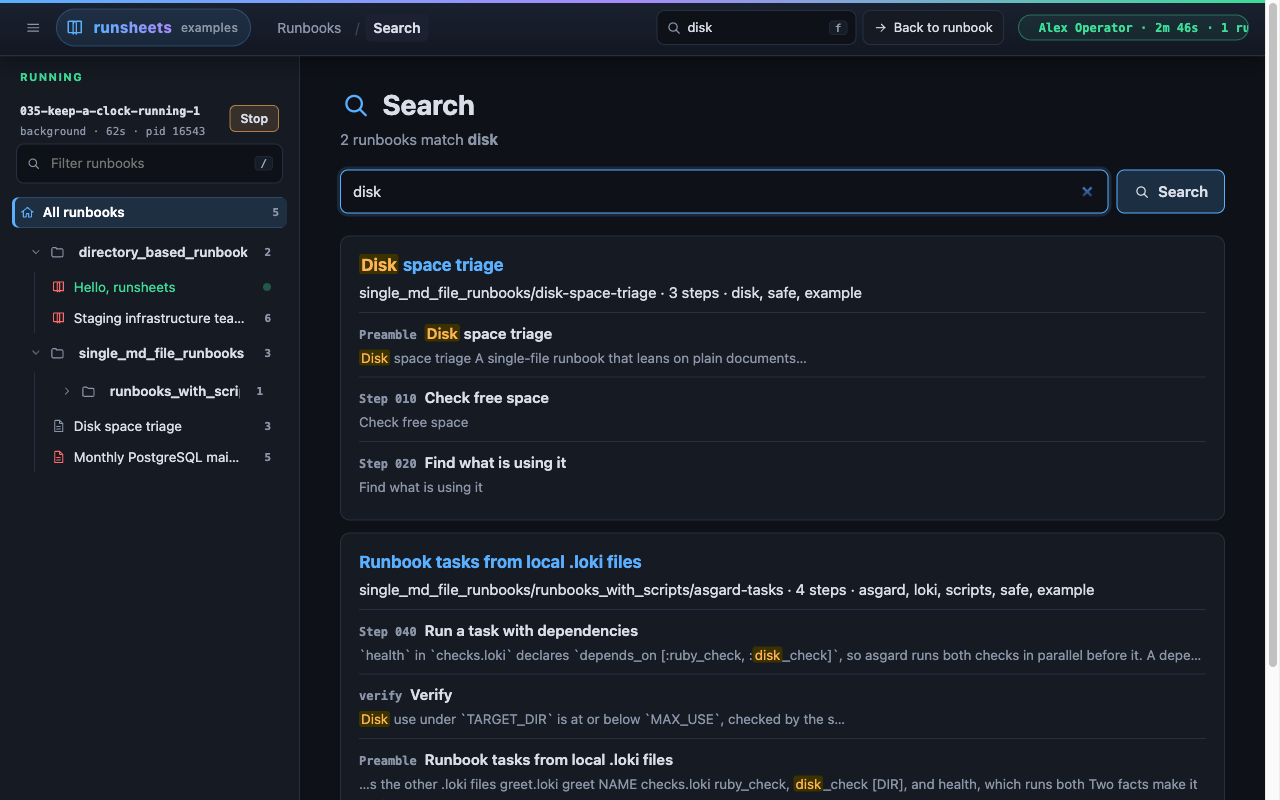
- What is searched: each runbook's title, its front matter prose
(when to use, prerequisites, blast radius, escalation, tags, input
names and prompts), its preamble, and every step,
verify.mdandrollback.md: titles, prose and code alike. Plain markdown documents are not searched. - How it matches: case is folded, and any run of whitespace, line
breaks included, counts as one space, so a phrase matches across a
wrapped line. Separate words must all appear somewhere in a runbook,
not necessarily together;
"a quoted phrase"must appear as written. A quote without a partner is ignored. - Results: one card per matching runbook, best first. A match in the title counts most, then the front matter, then step titles, then the text. Under each runbook are the documents that matched, up to five and then "and N more", each with a snippet and the words highlighted.
- Where results lead: a step of the runbook on screen goes straight to its page. Any other runbook opens in the library with the matching step highlighted in its step list; start or return to its run from there.
Keyboard shortcuts
| Key | Action |
|---|---|
| F | Focus the search box |
| N | The session page, with the note box focused |
| H | Home |
| R | Runbooks (the library, when started on a directory of runbooks) |
| Left / Right | Previous / next step, only when focus is on the page itself (not on a link or button) |
| S | Toggle the sidebar, on pages that have one |
| Esc | Leave a text field |
On the library page:
| Key | Action |
|---|---|
| / | Focus the filter box; Esc clears it |
| Down / Up (or J / K) | Move the cursor through the tree |
| Right / Left | Unfold / fold the folder under the cursor |
| Enter | Select the runbook or folder under the cursor |
| O | Press the selected runbook's button: Start run, Return to its run or Continue |
| B | Back to the runbook on screen |
| S | Toggle the tree |
The tree keys (arrows, J / K, Enter, O, B, /) work only when focus is on the page itself or inside the tree, so they do not take over a link or button in the main pane. Shortcuts are ignored while typing in a field. The footer lists the keys, N among them.
Errors
A request from the browser that cannot be honoured gets a page, not JSON
(JSON is for the page's script: the execute, acknowledge, stop and poll
endpoints, and any request that prefers application/json). The page has
a heading saying in words what went wrong, the specific message under
it, and links to Home and Session, plus Runbooks in a
library. With a runbook on screen it sits in that runbook's frame; in a
library with no runbook open it sits beside the tree.
| Status | Heading | Typical cause |
|---|---|---|
| 403 | Not allowed | Missing session token on a POST. (A Host header that is not loopback or the bind address gets a plain-text "Host not permitted" instead of a page.) |
| 404 | Not found | Unknown step, run, execution, file, or runbook slug. |
| 409 | Not right now | A POST before the session has started, no run for the runbook the page acts on, block not executable, blank input referenced, unknown execution to stop, acknowledging a block that is not terminal. |
| 410 | The session has ended | Only GET /session still answers. |
| 422 | Check what you entered | A step mark with a status other than done or skipped, or a mark on a document that is not a numbered step. (A blank name or reason on the start page, or a blank note, shows that page again with a message instead.) |
| 428 | A destructive block was asked to run without its confirmation code. The page handles this by prompting for the code. | |
| 500 | Something went wrong | The runbook no longer loads, or an unexpected error. |