Running
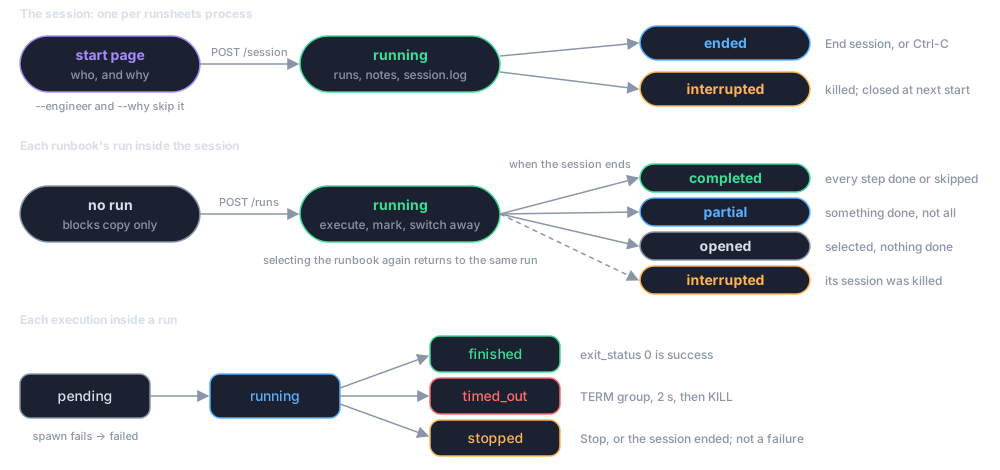
runsheets is a script an operator starts and stops. Everything between the two is one session: it serves runbooks on loopback, executes blocks on request in the operator's own environment, and writes a record of each runbook's run, and a log of the whole session, to disk. The runbook is a directory or a single all-in-one markdown file; given a directory of runbooks, the operator chooses among them in the browser.
-
runsheetsand its options, exit codes, and the environment variables it honours. -
The start page, the landing page, step pages, the session page, status marks, and keyboard shortcuts.
-
Fresh process per block, process groups, timeouts, working directory, output capture, and what the exit status means.
-
Where records go, the session's
session.jsonandsession.log, the layout of a run directory, therun.jsonschema and therun.mdtranscript.
A run is a record, not a sequence
Nothing executes without a run, but a run does not make you follow the steps in order or do all of them: select the runbook, open any step, and run just that block. See Sessions, Runs and Runsheets.
One session per process
A runsheets process holds one session, started by one engineer with a
note saying why. Inside it the engineer can select as many runbooks as the
work needs; each selected runbook gets one run, and switching between them
is allowed at any time. Every run stays open, and every background process
keeps running, until the session ends with End session or Ctrl-C. Then
each run is closed with a status worked out from what was done. To keep two
separate sessions, start two processes on different ports.
runsheets --run STEP starts a session too, without the web server: it
runs one step at the terminal and ends the session when the step ends.
See Running one step.
Where the shell comes from
Executed blocks inherit the environment of the shell that started
runsheets. If a runbook needs an SSO session, a VPN, a tunnel, or a
particular PATH, set those up in the terminal first, then start the
server from it.