Execution Model
One process per block
Every click on Run spawns a fresh process. The block's code is written to a file in the run directory and the language's interpreter is started with that file as its argument:
Nothing carries over between blocks except the environment runsheets
builds for each one. A cd, an export, a shell function defined in one
block does not exist in the next. This is a deliberate trade:
- Blocks stay copy-pasteable. What you see is exactly what ran.
- Executions are reproducible. The
.cmdfile plus the recorded inputs is the whole story. - A hung or killed block cannot poison the next one.
Values that must flow between blocks go through inputs, or are recomputed.
Environment
The child process receives, in this order of precedence:
- The
RUNSHEETS_*variables identifying the session, run, runbook, step and block:RUNSHEETS_SESSION_ID,RUNSHEETS_RUN_ID,RUNSHEETS_RUN_DIR,RUNSHEETS_RUNBOOK,RUNSHEETS_STEPandRUNSHEETS_BLOCK(see Inputs and Secrets). - The run's inputs, secrets included.
- The full environment of the
runsheetsprocess.
Standard input is /dev/null. A read returns immediately with nothing;
use a terminal block for anything interactive.
Working directory
The runbook directory, unless the step's front matter sets cwd, which is
resolved relative to the runbook directory. Relative paths in a block
therefore mean the same thing on every operator's machine.
Output
Standard output and standard error both go to one pipe, interleaved in the
order the process wrote them. A thread in the runsheets process reads the
pipe, passes each chunk through the run's redactor (see
Inputs and Secrets), and appends it to
the execution's .out file, flushing after every chunk. The same redacted
output goes to the session log, one line at a time, each marked > and
tagged with the execution id (see
The session log). The page polls the
tail of that file every half second while the process runs (every three
seconds while the tab is hidden), so a command
that prints progress is seen printing it. Up to 256 KB of the tail is shown
in the page, with a marker when there is more; the file holds everything.
Output is decoded as UTF-8 with invalid bytes replaced, both for the page and for the transcript.
When the process exits, runsheets waits up to one second for the reader to
drain the pipe before marking the execution finished. A grandchild the
block left behind (nohup something &) keeps the pipe open; its later
output still lands in the file, but the execution is reported finished
without waiting for it.
Timeouts
Each step's timeout (default 600 seconds) bounds every execution of its
run and destructive blocks. background blocks have no timeout. When
it expires:
SIGTERMis sent to the process group, not just the interpreter, so asleepor anawscommand started by bash receives it too.- runsheets waits up to two seconds for the group leader to exit.
SIGKILLis sent to the group if it has not.
The execution is recorded with state timed_out. Its exit_status is
128 + signal (143 for TERM, 137 for KILL), matching what a shell would
report, and signal holds the raw number.
The process group is created with pgroup: true at spawn, so the killing
cannot reach anything the operator's shell started.
Leftover children
A block's process can exit while something it started is still running
in its group: kubectl port-forward … &, nohup ./server &. When the
block's own process has been reaped, runsheets sends SIGTERM to the
group, waits up to two seconds, then sends SIGKILL, the same as a
timeout. The execution's state and exit status are the block's own. A
process meant to keep running belongs in a background block, which has
Start and Stop buttons and is stopped when the session ends.
Stopping
A running execution can be stopped by the operator: the Stop button on a
background block, the Stop button in the sidebar's Running panel, or
POST /executions/:id/stop. The same TERM, wait, KILL sequence runs and
the execution is recorded with state stopped. Stopping is not a failure:
the block's border turns amber, not red, and the step is not marked failed.
Switching to another runbook stops nothing: a block keeps running, and the Running panel in the sidebar lists it on every page with its runbook's slug, so it can be stopped from anywhere. Ending the session, with End session or Ctrl-C, stops everything still running in every runbook and waits up to three seconds for the process groups to go away before each run is closed.
States and verdicts
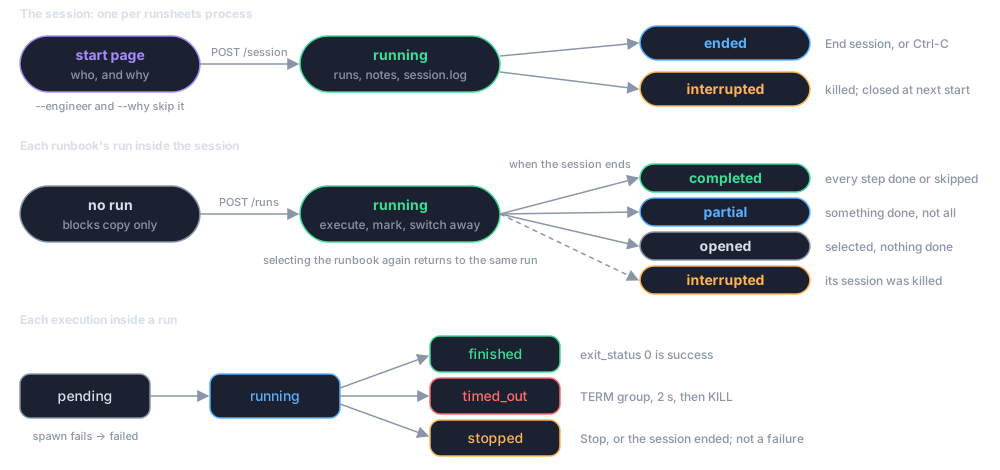
| State | Meaning | exit_status |
|---|---|---|
pending |
Created, not yet spawned. Visible only for an instant. | null |
running |
The process is alive. | null |
finished |
The process exited on its own. | its exit code, or 128 + signal if a signal from elsewhere ended it |
timed_out |
runsheets killed it when the step's timeout expired. | 128 + signal |
stopped |
The operator stopped it, or the session ended while it was running. | 128 + signal |
failed |
It could not be spawned (interpreter not found, permission denied). error holds the message. |
null |
An execution is a success only when its state is finished and its
exit status is 0. It is a failure when it is finished with any
other status, timed_out, or failed. A stopped execution is neither.
The page colours the block, and the sidebar marks the step, on those
definitions.
Concurrency
Blocks can run concurrently: clicking Run on two blocks starts two processes. Each has its own files and its own entry in the record, ordered by start time. The server itself is a small Puma instance with a handful of threads; the polling endpoints are cheap file reads.
What is not sandboxed
Nothing. A block runs as you, with your environment, on your machine. That is the point of the tool and also why it executes only what the author opted in and the operator clicked. See Security Posture.