Configuration Precedence
A setting can come from several places at once. This page shows the order aia applies them in, so you can predict which value wins and track down a surprise.
The layers
aia starts from its built-in defaults and applies each layer on top of the last. A later layer overrides only the keys it sets; everything else passes through.
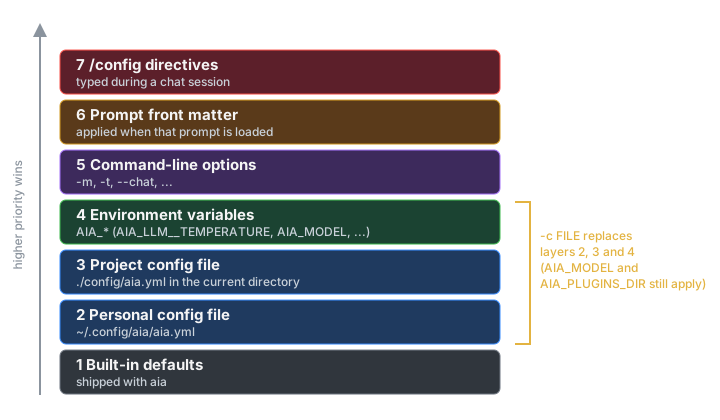
| # | Layer | Where it comes from |
|---|---|---|
| 1 | Built-in defaults | Shipped with aia. Listed in Configuration Keys. |
| 2 | Personal config file | ~/.config/aia/aia.yml (or $XDG_CONFIG_HOME/aia/aia.yml). See The Config File. |
| 3 | Project config file | ./config/aia.yml in the directory you run aia from. |
| 4 | Environment variables | AIA_*, such as AIA_LLM__TEMPERATURE, plus AIA_MODEL and AIA_PLUGINS_DIR. See Environment Variables. |
| 5 | Command-line options | -m, -t, --chat … See Command-Line Options. |
| 6 | Prompt front matter | The YAML at the top of a prompt file, applied when that prompt is loaded. See Prompt Files. |
| 7 | /config and friends |
Directives you type during a chat: /config, /model, /temperature, /top_p. |
A worked example
Suppose every layer has an opinion about the temperature:
<!-- ~/.prompts/extract_dates.md        (layer 6) -->
---
temperature: 0.0
---
List every date mentioned in the text, one per line, in ISO 8601.
You run (from ~/work/api) |
Temperature used | Why |
|---|---|---|
aia --chat |
0.4 |
The project file overrides your personal file. |
AIA_LLM__TEMPERATURE=0.9 aia --chat |
0.9* |
The environment overrides both files. |
aia -t 0.2 --chat |
0.2 |
The command line overrides the environment. |
* aia converts the text 0.9 to a number; see Environment Variables. The order is the same for every key.
If you then run aia -t 0.2 extract_dates contract.txt, the prompt's temperature: 0.0 replaces 0.2 when the prompt is loaded, so that prompt runs at 0.0.
Check any combination without calling a model by adding --dump:
$ cd ~/work/api && aia -t 0.2 --dump /tmp/c.yml && grep temperature /tmp/c.yml
Config successfully dumped to /tmp/c.yml
  :temperature: 0.2
--dump shows layers 1–5. Front matter and directives are applied later, while aia runs.
When layers 6 and 7 take effect
aia builds the model connection (the robot) once, at startup, from layers 1–5. Front matter and directives are applied later, while aia runs, and they update the configuration from that point on:
- Model settings apply before the next prompt or chat turn.
temperature:,top_p:andconfig: llm:in a prompt's front matter, and/temperature,/top_por/config llm.…in chat, retune the running robot (and every crewmate) in place, so the conversation is kept. - A different model rebuilds the robot. A front-matter
model:switches models before that prompt runs, the same way/modeldoes in chat, and carries the conversation over asmodel_switch_historysays (see Chat Sessions). - Other settings apply right away — for example the output file, the pipeline (
next:/pipeline:), or flags such astokens.
Front matter lasts for the rest of the run
When aia loads a prompt, its front matter changes the running configuration and the change stays in place. In a pipeline, a setting made by the first prompt is still in effect for the second prompt unless that prompt sets its own.
-c replaces layers 2–4
-c FILE (--config-file) swaps in a different configuration instead of adding another layer. With it, aia applies:
- Built-in defaults
FILEAIA_MODELandAIA_PLUGINS_DIR, if set- Command-line options
- Front matter and directives, as usual
Your personal config file, any ./config/aia.yml, and all other AIA_* variables are ignored for that run. Use it to keep self-contained setups — "local models only", "work account" — that your everyday settings can't leak into.
Lists are replaced, not merged
When a higher layer sets a list — models, pipeline, tools.paths, mcp_servers — it replaces the lower layer's list. -m gpt-4o on the command line means only gpt-4o, even if your config file lists three models.
Some command-line options add to what came before them on the same command line: -m, -s, -n, -p, --rq, --at, --rt, --mu, --ms and --mcp can be repeated. --mcp FILE adds its servers to the mcp_servers from your config file.
Troubleshooting a setting
- Run
aia --dump /tmp/c.ymlwith the same options and from the same directory. If the value is wrong there, it comes from layers 1–5. - Run
env | grep '^AIA_'to spot a forgottenexport. - Look for
config/aia.ymlin the current directory. - If
--dumplooks right but the run doesn't, check the prompt's front matter: it is applied after--dumpreads the configuration. - In chat,
/configshows the live values.